You know the drill. A board resolution needs to be passed between two meetings. You print the document, chase every director to collect signatures, one is on vacation, another stopped answering emails, and three weeks later the document is still sitting on the corner of the president's desk. Meanwhile, the syndicate registry — the one Bill 16 requires you to keep current — keeps falling behind.
We decided to fix this. This week, CondoAide is rolling out a full electronic signatures module, paired with a SHA-256 fingerprint system and a public verification page open to anyone: condoaide.ca/verifier. Here's what it means in practice for your syndicate.
1. Your signature, configured once
Most signing tools ask you to redraw your name on every document. We thought that was pointless. You configure your signature once, in your profile, and it gets reused everywhere.
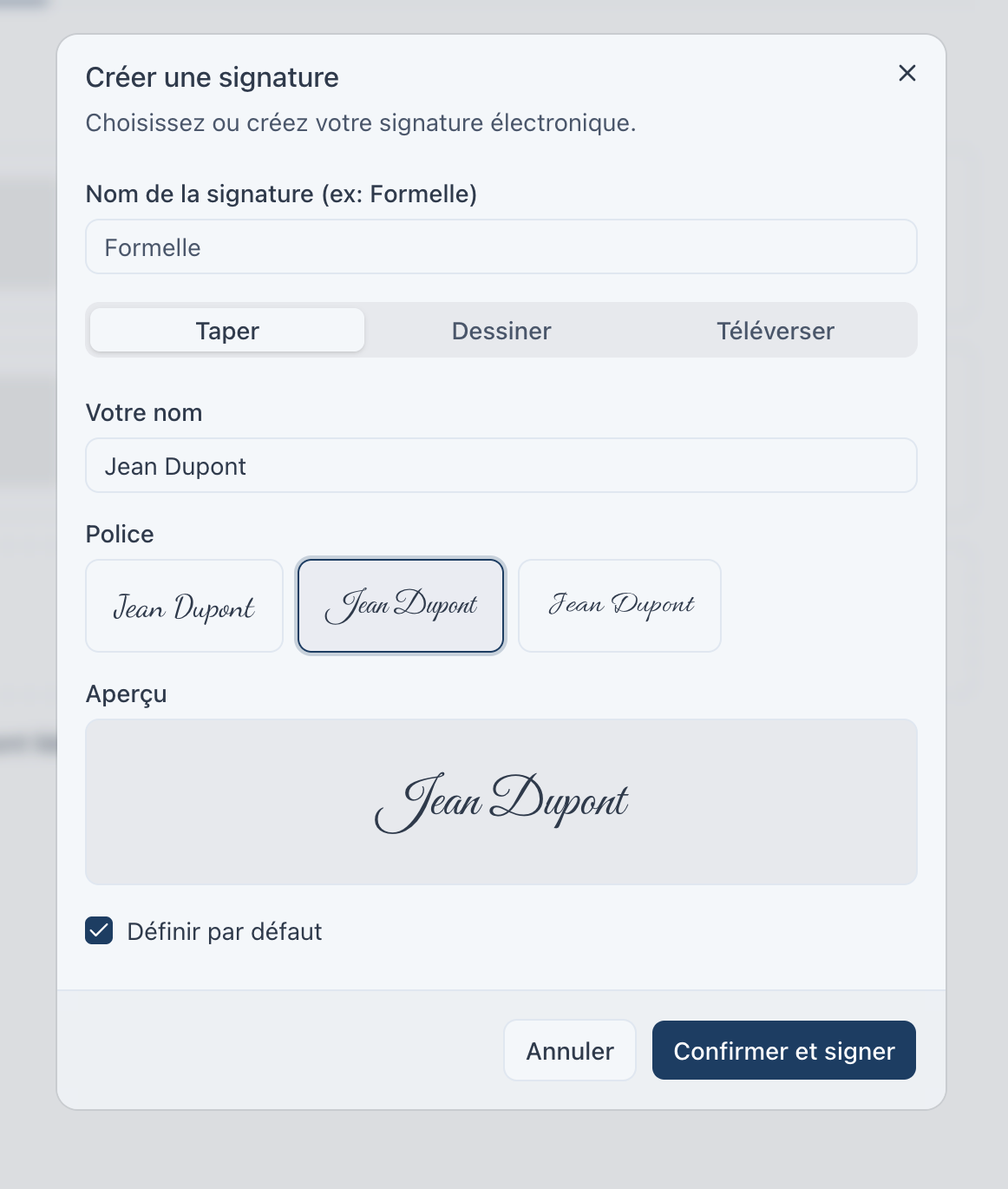
Three styles are available:
Type — You enter your name and we render it in cursive. Three fonts available: Dancing Script, Great Vibes, and Allura. This is the fastest option and it looks professional.
Draw — For those who prefer to trace their signature on a trackpad or touchscreen. We save the stroke as SVG, so the quality stays sharp at any size.
Upload — Already scanned your handwritten signature from paper? Upload the PNG, we detect the white background and make it transparent automatically.
Once your signature is saved, check "Set as default" and you're done. Signing the next resolution takes two seconds.
2. Draft a resolution with AI assistance
Writing a board resolution properly isn't obvious. You have to respect a certain formalism — "WHEREAS... BE IT RESOLVED THAT..." — and many volunteer directors aren't necessarily comfortable with legal-style drafting.
We built AI assistance directly into resolution creation. You write the idea in plain language:
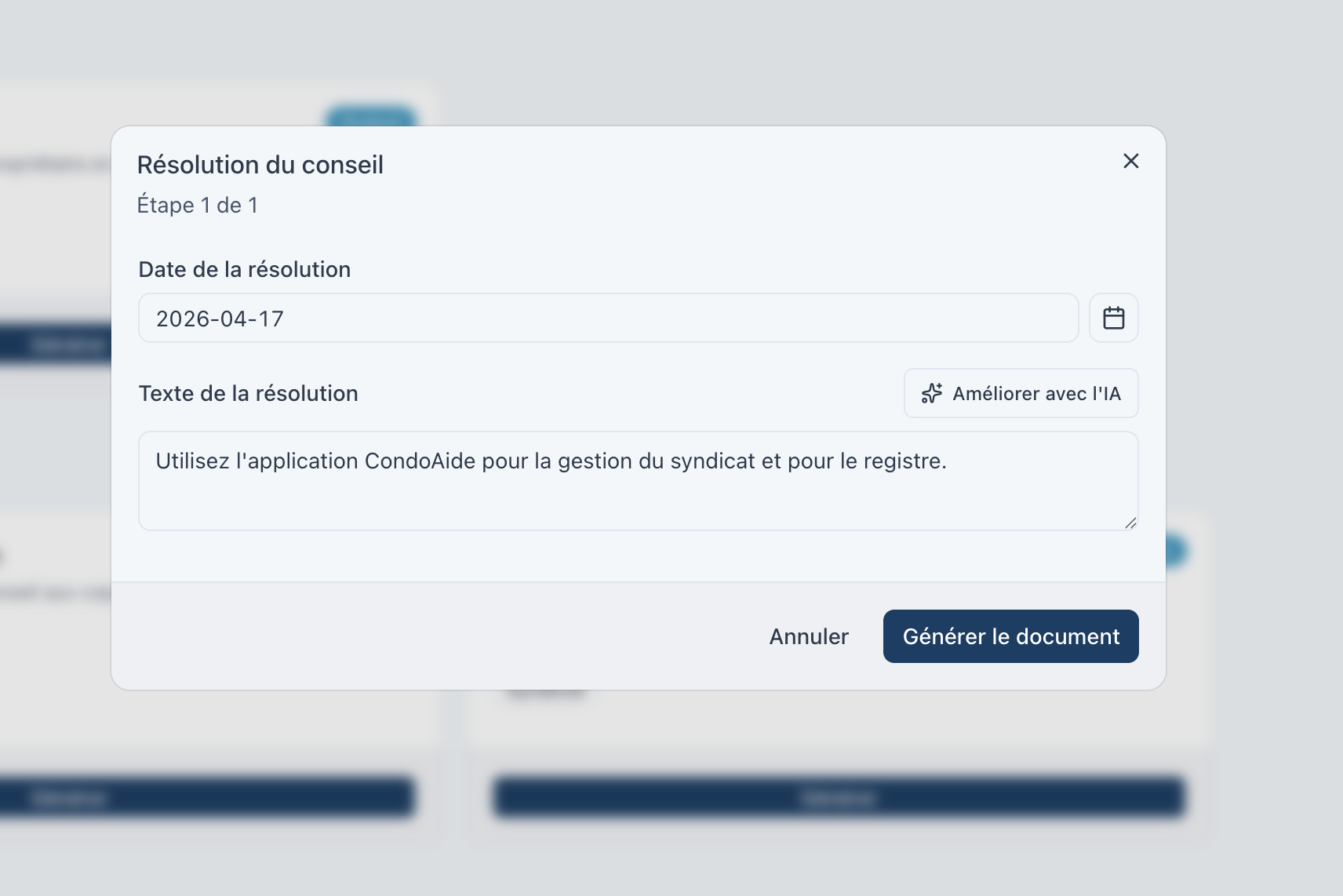
Then click "Improve with AI." Within seconds, the tool proposes a structured version, with the whereas clauses, the operative paragraph, and the phrasing expected in a board of directors' minutes:
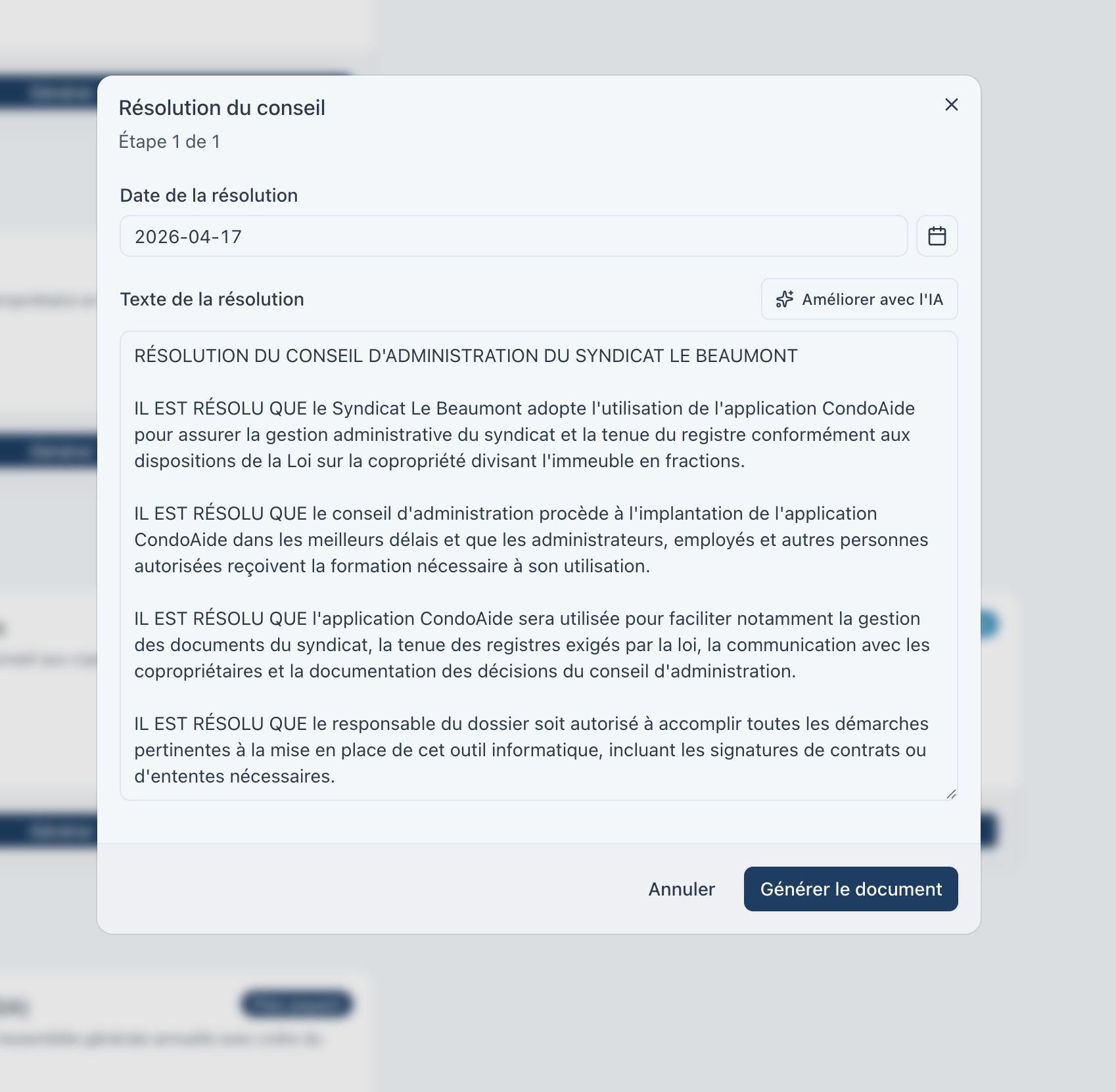
You can adjust the text before sending — the AI proposes, you decide. The goal is to remove the "blank page syndrome" so you can document your decisions properly instead of putting it off.
3. A SHA-256 fingerprint at the moment of locking
Once all signers have signed, the document is locked. And at the moment of locking, we compute a SHA-256 fingerprint of the final PDF. That's a 64-character string that uniquely identifies the file.
Why does it matter? Because a single byte modified in the PDF — even an added space — produces a completely different fingerprint. That fingerprint is stored in our registry, and it's immutable: once the document is locked, it cannot be changed.
This is what turns an electronic signature into integrity proof: we don't just prove who signed, we also prove that the document in your hands is actually the one that was signed, with no modifications after the fact.
4. A public page to verify any document
Here's where it gets interesting. Even someone without a CondoAide account — a co-owner, a notary, a prospective buyer, a regulator — can verify that a signed document is authentic.
It happens at condoaide.ca/verifier. You upload the PDF, we compute its fingerprint, and we compare it against our registry.
If the document is authentic, you see this:
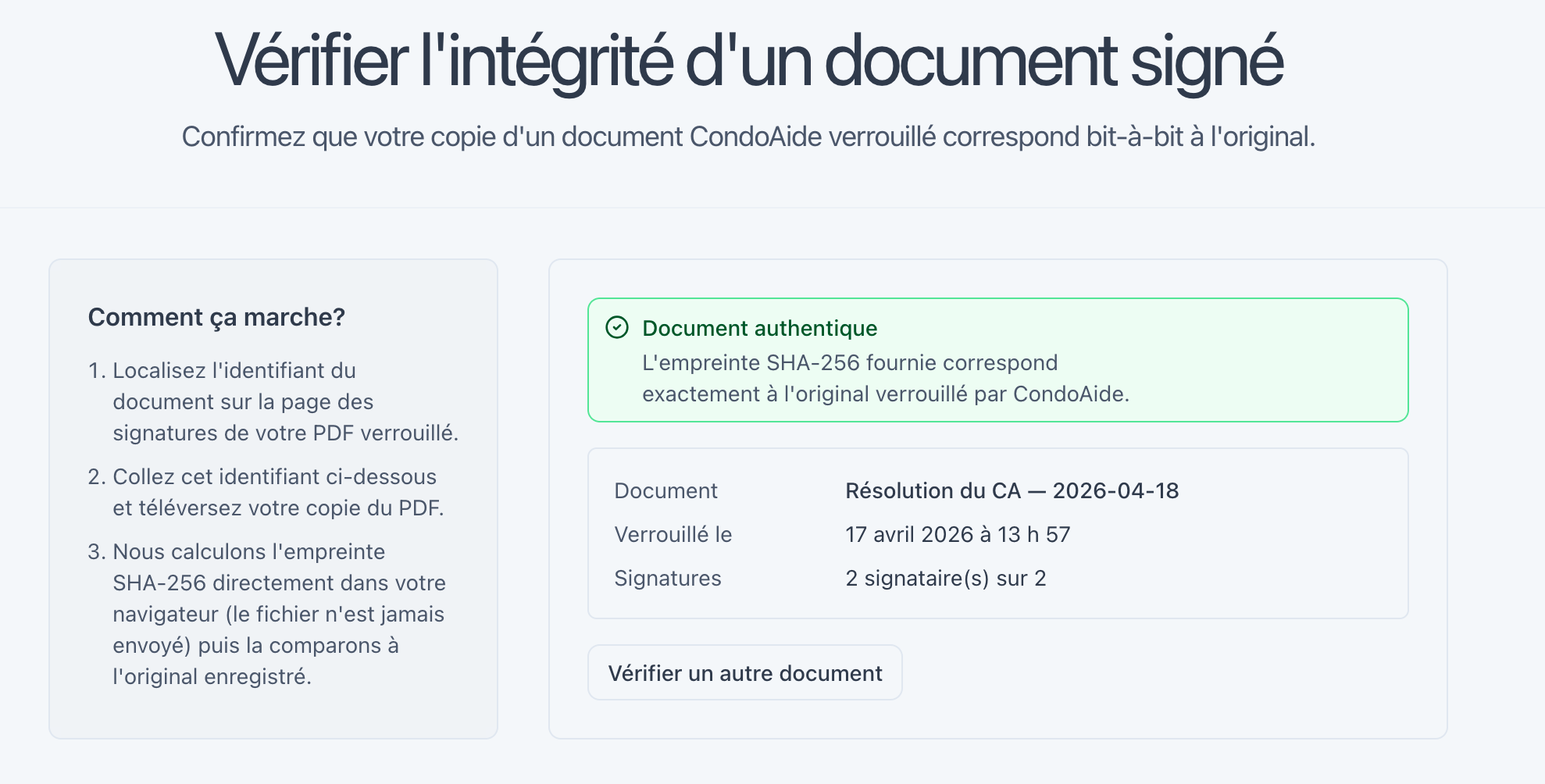
The page shows:
- Document authentique (Authentic document) — status, in green
- The document title ("Résolution du CA — 2026-04-18")
- The exact locking time ("17 avril 2026 à 13 h 57")
- The signature count ("2 signatures sur 2")
- The full SHA-256 fingerprint
No account required. No sign-up. Verification works because the fingerprint of the file you present matches the one registered at the moment of locking.
5. What if someone modifies the document?
Say a disgruntled director grabs the signed PDF, opens it in a viewer, scribbles "je ne suis pas d'accord" (I don't agree) in the margin, and forwards it to another co-owner claiming it's the original:
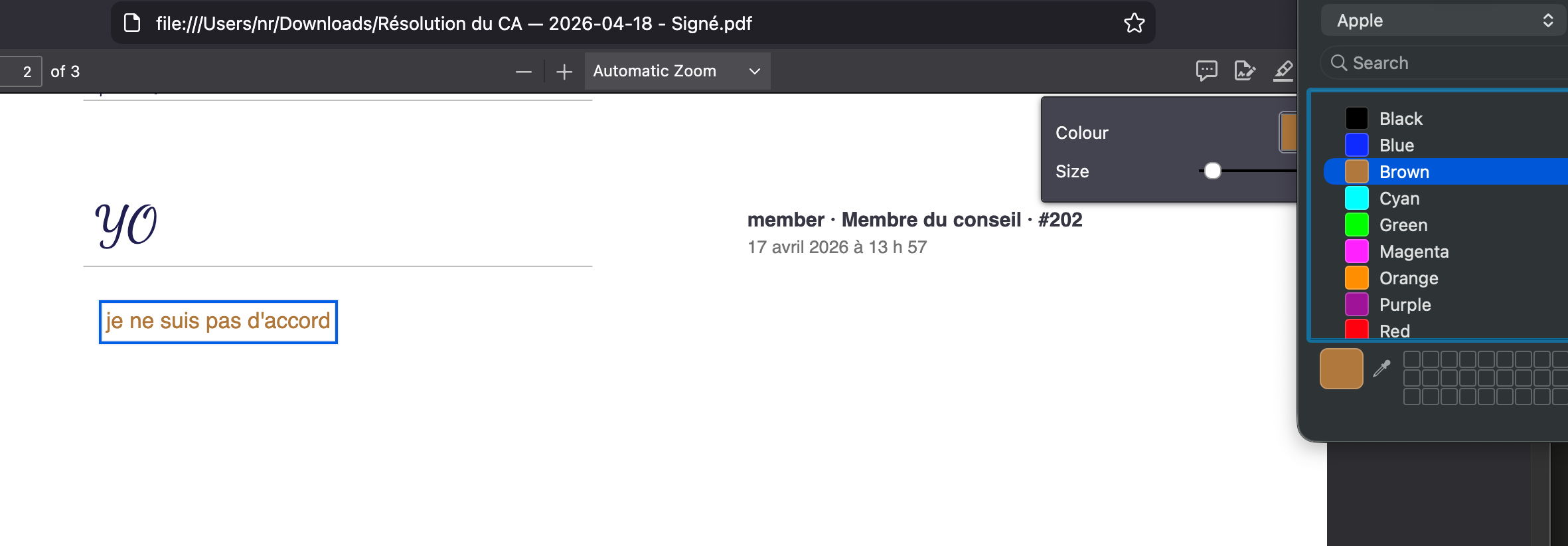
The file still looks like a signed resolution. The signatures are still there. Visually, nothing jumps out. Except the SHA-256 fingerprint of the new file is no longer the same.
When we drop it into the verification page, here's what we get:
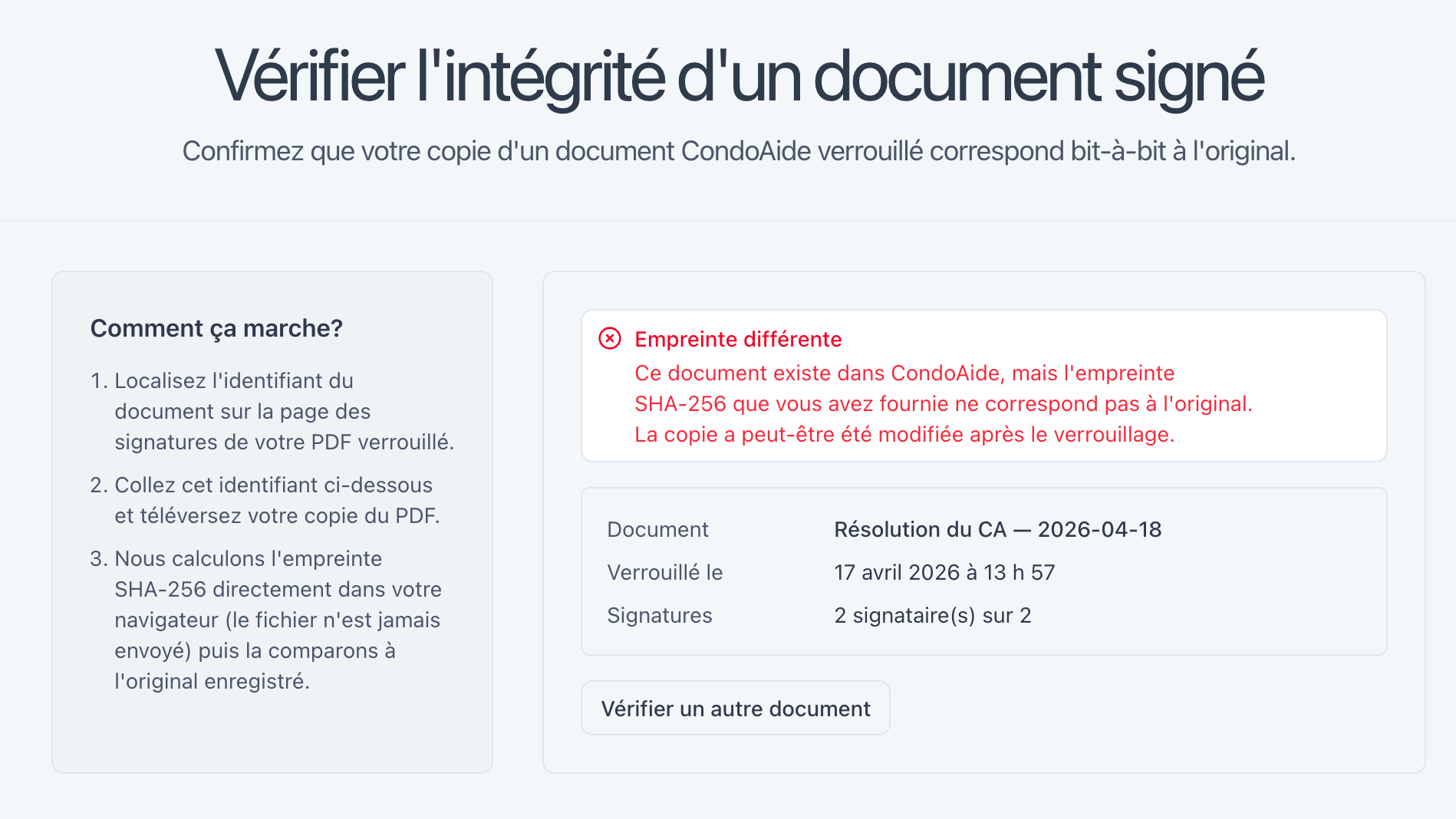
Empreinte différente (Different fingerprint)
This document exists in CondoAide, but the SHA-256 fingerprint you provided does not match the original. The copy may have been modified after locking.
The page doesn't accuse anyone — it simply notes that the file presented isn't the one that was signed. The original document still exists in the registry, and CondoAide can pull it up. Any modification made after locking, even a simple annotation, is detectable.
This is the kind of guarantee you simply couldn't get with scanned paper signatures.
A word on legal validity
Quebec's Act to establish a legal framework for information technology (LCCJTI), in its article 39, recognizes the validity of electronic signatures as long as a link can be established between the person and the document. The principle is technological neutrality: the law doesn't mandate a specific technology, it asks that document integrity and signer identity can both be established.
For board resolutions signed by all directors, article 354 of the Civil Code of Québec states that they carry the same weight as a resolution passed in a formal meeting. In other words, your board can pass resolutions between meetings, without having to call a formal gathering, as long as all directors sign.
The combo of electronic signature + SHA-256 fingerprint + centralized registry gives you, for internal board decisions, exactly what article 39 asks for: a clear link between each signer and the document, and an integrity guarantee that anyone, anywhere, can verify at any time.
What's coming next
Electronic signatures are available starting today for all CondoAide accounts — the free plan includes 3 signed documents per month, and paid plans go unlimited. The module plugs into the V2 registry we rolled out last month: every signed document is automatically archived in the syndicate's registry, with deletion protection for permanent-retention documents.
Next up is the meeting minutes module with built-in signatures for the chair and the assembly secretary. We're targeting the coming weeks. The clients who asked us for this over the past few months — you know who you are — we'll write you as soon as it's ready.
In the meantime, try the verification page with a document you've already signed. It takes about 10 seconds, and it gives you a good sense of what your co-owners will see when they want to verify the authenticity of a resolution.