"What exactly does a co-owner see when they log in?" The question comes up every time a syndicate is about to invite its members, and it deserves a precise answer rather than a statement of intent.
This guide gives that answer screen by screen, for CondoAide's three internal profiles.
Three profiles, not four
One thing surprises people: the account owner and a board member hold exactly the same permissions. These are not two tiers of access, but one tier carried by two titles.
What sets the account owner apart comes down to four governance actions, listed at the end of this guide - and none of them opens or closes a module.
The three profiles are:
- Board / Account owner - the board of directors and the account owner;
- Co-owner - the member who owns a fraction;
- Renter - the occupant who does not own.
A useful reminder, developed in Role, unit ownership and a board seat: the access role, owning a unit and holding a board seat are three independent axes. Only the access role decides what follows.
The three menus, side by side
The fastest way to grasp the difference is to look at the three sidebars of the same syndicate:
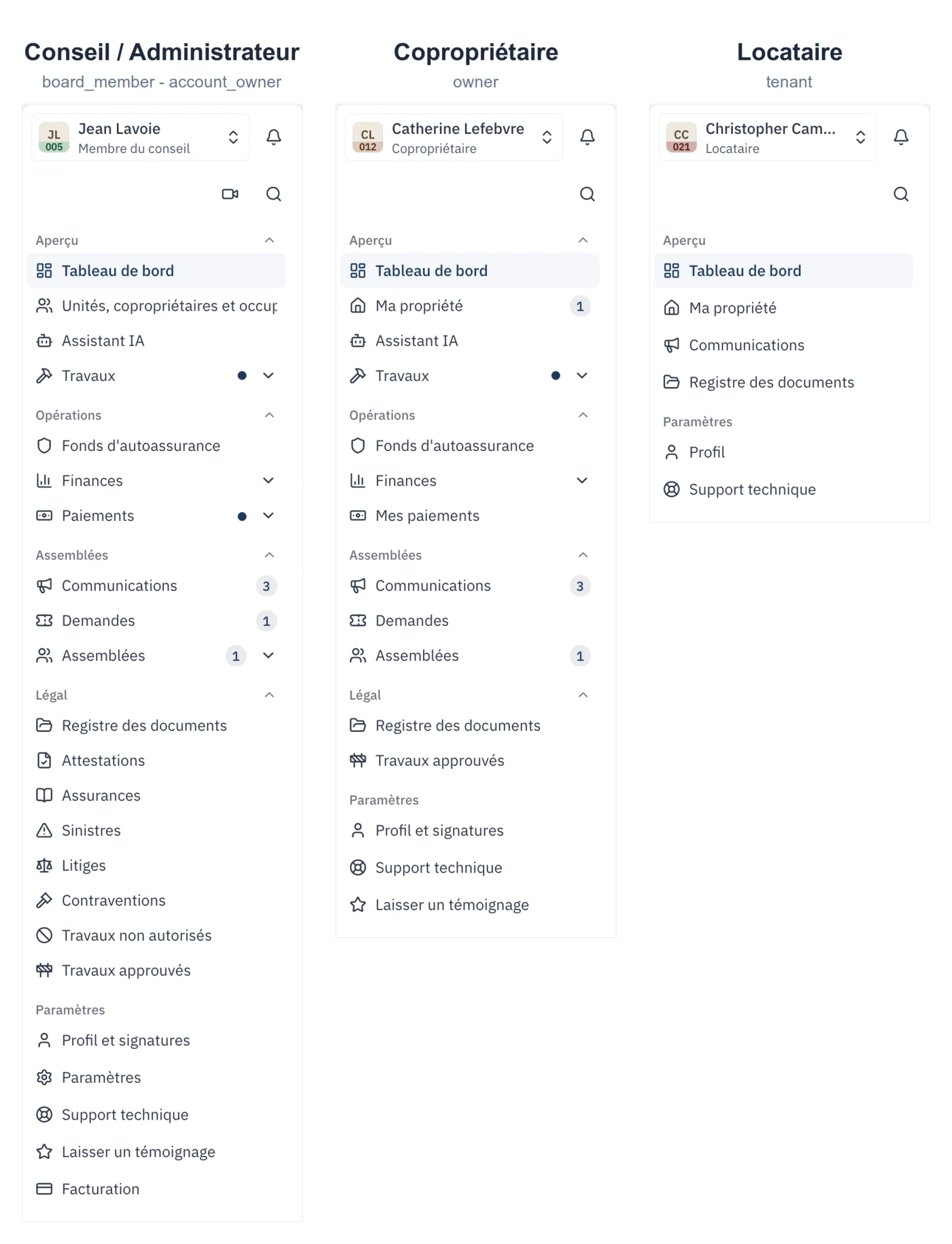
The board menu groups Overview, Registries, Communications, Works, Finances, Meetings and assemblies, Insurance and claims, Legal and Settings. Entries vary with permissions and syndicate configuration. Renters retain two groups, Overview and Settings.
The full table
Edit means create, change or delete. View means read without being able to change. A dash means the module is not offered to that profile.
Overview
| Screen | Board / Account owner | Co-owner | Renter |
|---|---|---|---|
| Dashboard | Edit | View | View |
| My property | Edit | Edit (their unit) | View (their home) |
| AI assistant | Yes | Yes | - |
| My property → My payments (tab) | Edit | Edit (their mandate) | - |
Registries
Co-owners and renters have no Registries group: their Documents and Restricted-area charges (PCUR) entries sit under Overview.
| Screen | Board / Account owner | Co-owner | Renter |
|---|---|---|---|
| Co-owners | Edit | - | - |
| Units → Restricted-area charges (PCUR) (tab) | Edit | View | - |
| Documents | Edit | View | View |
Communications
Renters find Inbox and Requests under Overview.
| Screen | Board / Account owner | Co-owner | Renter |
|---|---|---|---|
| Inbox | Edit | View + write | View |
| Requests | Edit | Create and track their own | Create and track their own maintenance, complaint and general requests; the unit’s co-owners can view the requests filed while they own it, along with the board’s replies; the co-owner who receives the unit’s notices is informed |
Each document retains its own access level, including board-only access.
Co-owners view their mandate and payment history inside My property. The co-owner PCUR shortcut appears under Overview and opens the corresponding Units tab.
Works
| Screen | Board / Account owner | Co-owner | Renter |
|---|---|---|---|
| Works (work orders) | Edit | View | - |
| Building components | Edit | View | - |
| Maintenance logbook | Edit | View | - |
| Vendors | Edit | - | - |
Finances
| Screen | Board / Account owner | Co-owner | Renter |
|---|---|---|---|
| Contingency fund | Edit | View | - |
| Self-insurance fund | Edit | View | - |
| Financial Statements (overall position) | Edit | View | - |
| Ledger and transactions | Edit | - | - |
| Budget | Edit | View | - |
| Contributions | Edit | View | - |
| Other revenue | Edit | - | - |
| Syndicate payments | Edit | - | - |
A co-owner sees the syndicate's overall financial position: fund balances, the adopted budget and contributions. They do not see the ledger line by line, which includes other units' arrears.
Assemblies
| Screen | Board / Account owner | Co-owner | Renter |
|---|---|---|---|
| Meetings and minutes | Edit | View + vote | - |
| Proxies | Edit | From "My property" | - |
| Vote assignments | Edit | - | - |
Insurance and claims
| Screen | Board / Account owner | Co-owner | Renter |
|---|---|---|---|
| Insurance | Edit | - | - |
| Claims | Edit | - | - |
Legal
| Screen | Board / Account owner | Co-owner | Renter |
|---|---|---|---|
| Certificates | Edit | View | - |
| Litigation | Edit | - | - |
| Contravention notices | Edit | From "My property" | - |
| Unauthorized works | Edit | From "My property" | - |
| Approved works | Edit | View | - |
Settings
| Screen | Board / Account owner | Co-owner | Renter |
|---|---|---|---|
| Profile and signatures | Edit | Edit | Edit |
| Syndicate settings | Edit | - | - |
| Import | Edit | - | - |
| Billing | Edit | - | - |
| Support | Yes | Yes | Yes |
What only the account owner can do
Four actions, all of them governance:
- Manage external access - open a narrow access for an accountant, a vendor, a building professional, legal counsel or an insurer, from the access-management tab on the members page.
- Assign board offices - president, secretary, treasurer. These titles print on signed minutes: they are conferred by the syndicate, never self-declared.
- Confirm a board seat, for the same reason.
- Transfer account ownership to another member of the syndicate.
A board member who tries any of the four simply will not see the option. And nobody, not even the account owner, can change their own access role: that is what stops them from locking themselves out of their own syndicate.
The renter, in one sentence
A renter sees their home, their requests, the syndicate's announcements and the document registry. No syndicate financial data is shown to them: no budget, no contributions, no funds, and none of the other units' data.
Inside "My property", renters see neither a debit mandate nor payment history. The charges communes are owed by the co-owner, not by their tenant, and it is from the co-owner that the syndicate collects.
"Locataire" is an access role, not a lease
CondoAide records the person as a renter of a unit, and stops there: the lease itself is not kept. Not the document, not the rent, not the dates. The role describes who reaches what in the application, not the contractual relationship - that one binds the co-owner and their tenant, and the syndicate is not a party to it.
That does not put the tenancy beyond the syndicate's reach. A co-owner who leases their private portion must notify the syndicate within 15 days and state the tenant's name, the duration of the lease, and the date they handed over a copy of the building's by-laws (art. 1065 al. 2 CCQ).
Of those three, CondoAide carries only the first: the name, on the occupant's record. Lease duration and the date the by-laws were handed over are not fields in the product. If your syndicate wants to keep that record - and it has good reason to - file the co-owner's notice in the document registry.
One last distinction, because it comes up often: the same rule applies "with the necessary adaptations" when the unit is occupied otherwise than by lease. That is the Occupant role, distinct from Locataire, and it has a guide of its own: Recording an occupant who is neither owner nor tenant.
Outside parties
Accountant, vendor, building professional, legal counsel, insurer: these accesses exist, they are narrower than a co-owner's, and they are opened one at a time. An accountant engaged for an audit gets read access to the finances; a vendor sees only the works that concern them.
They are covered in a separate guide, because they come with a signed access agreement.
Changing someone's role
Under Registries → Co-owners, open the person's record, then Edit → Access role. The change takes effect immediately, on the next page they open.
One reminder that heads off a common mistake: giving someone the "Co-owner" role assigns them no unit, and assigning them a unit does not change their role. The two are separate actions.