The contingency fund (fonds de prévoyance) grows year after year, but its balance does not say what it is meant for. An earmark answers that question: it is a part of the fund the board sets aside for planned work, such as caulking the building envelope or modernizing the elevator.
The money does not move. It stays in the fund and in its bank account, and the fund balance does not change. CondoAide simply keeps count, earmark by earmark, of what is set aside, what has been spent and what is still free.
The examples below come from a demo condo whose contingency fund holds $118,500.00.
1. When to use an earmark
An earmark is useful when the board wants to put money aside, over several months or years, for specific work that the contingency fund study plans. It makes visible, to the board and to the co-owners alike, the part of the fund that is already promised.
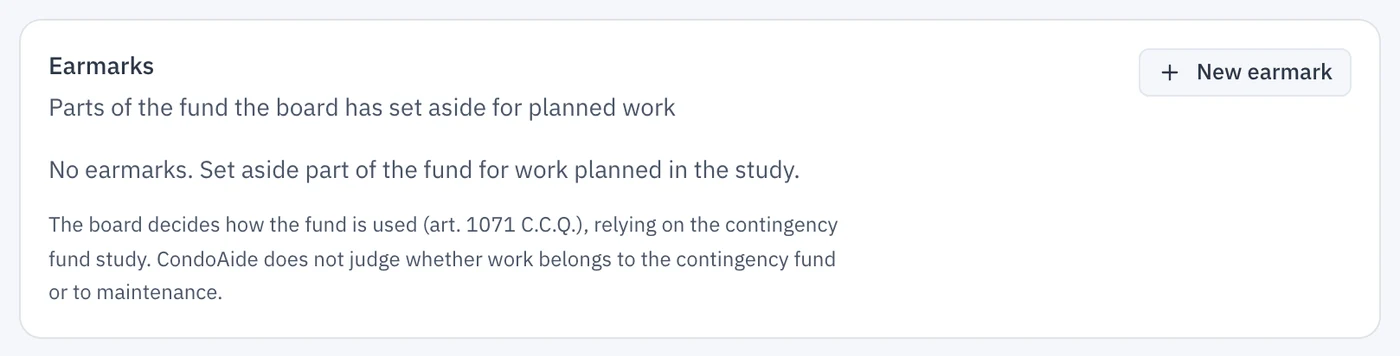
It is not a way to decide whether the fund may pay for some work. The contingency fund is for major repairs and the replacement of common portions (art. 1071 C.C.Q.), and the board decides how it is used, relying on the study. CondoAide does not judge whether work belongs to the contingency fund or to maintenance. If the study does not mention the work you have in mind, check with the firm that prepared it before setting money aside for it.
The Earmarks card is in Contingency fund, Overview tab, below the fund balance. Until an earmark exists, it invites you to create one.
2. Create an earmark
- Click New earmark.
- Give it a Name everyone will understand, such as « Building envelope caulking ».
- In Work plan item, pick the matching work from the work plan. The link is optional, but it pays off later: when you mark that work completed, CondoAide offers this earmark to pay the invoice. The link can only be chosen when the earmark is created.
- Enter the Target amount, often the cost the study plans, and the Target year. Both are optional and change no balance: they track progress.
- Add a Note if the board wants a record of its decision, then click Create earmark.
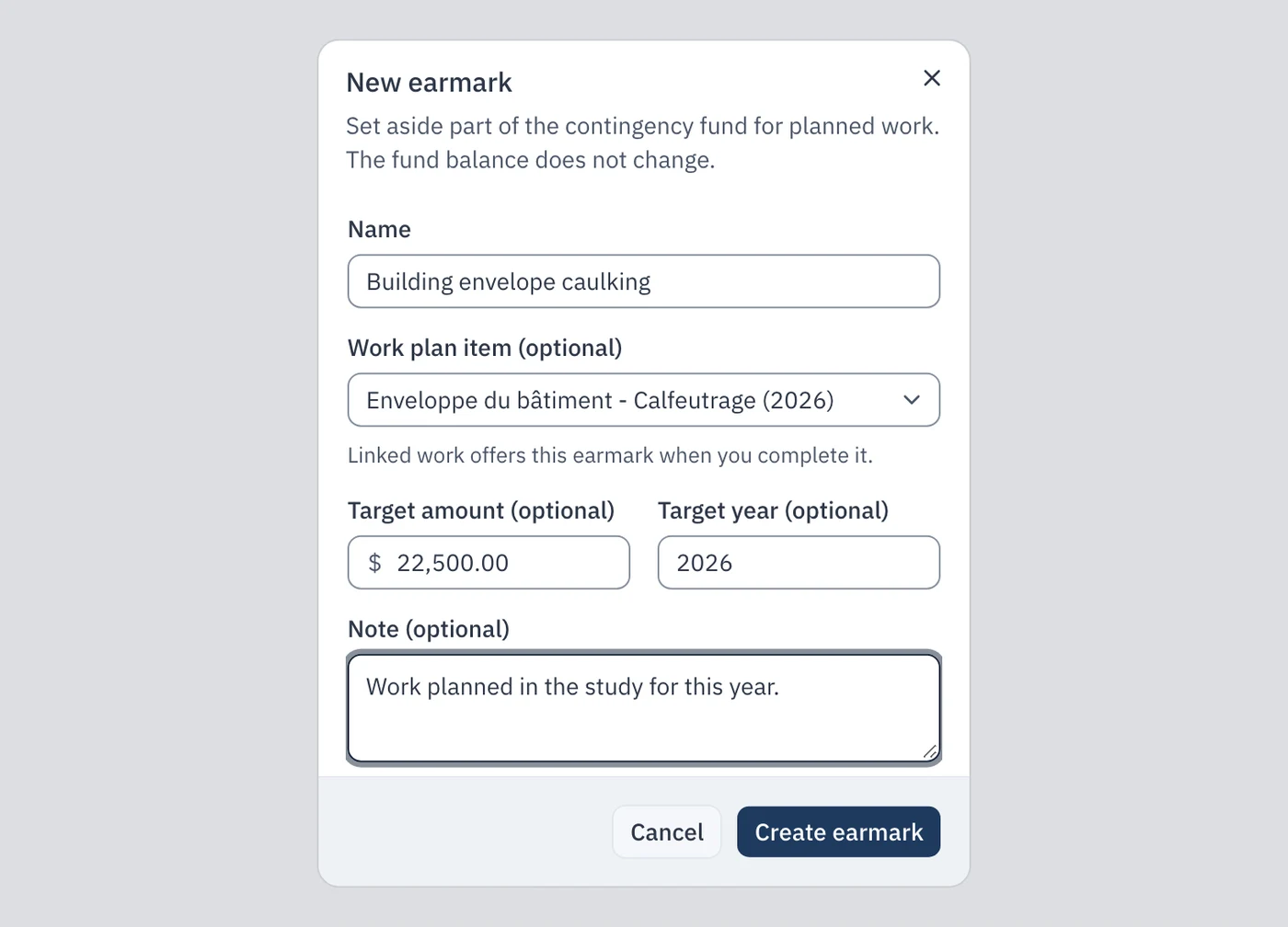
A new earmark is empty. Now you put money into it.
3. Set money aside, take it back, change the target
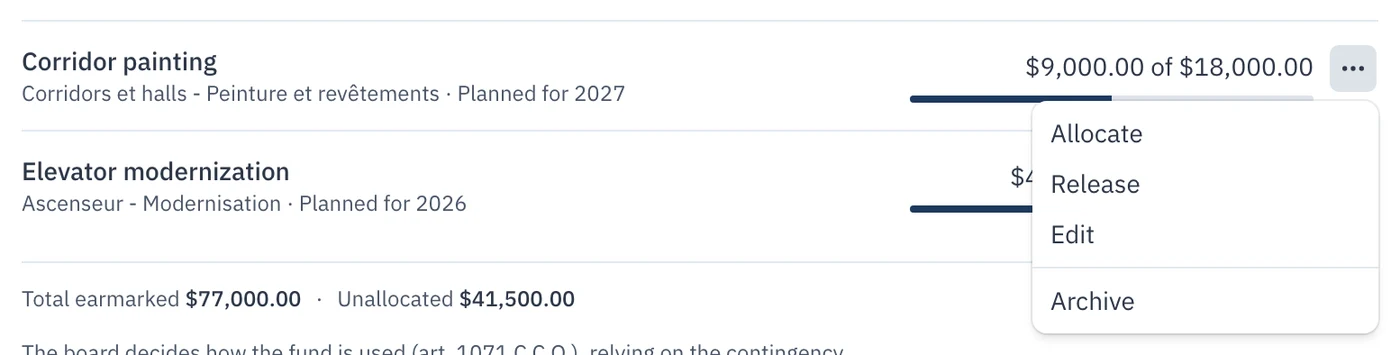
Each row of the card has a menu at its end, with four choices: Allocate, Release, Edit and Archive.
Allocate
Allocate sets an amount of the fund aside for the earmark. The window shows what is Available, meaning the part of the fund not yet set aside for anything; a larger amount is refused. The date is today's, and you can move it back, but not into a closed fiscal year.
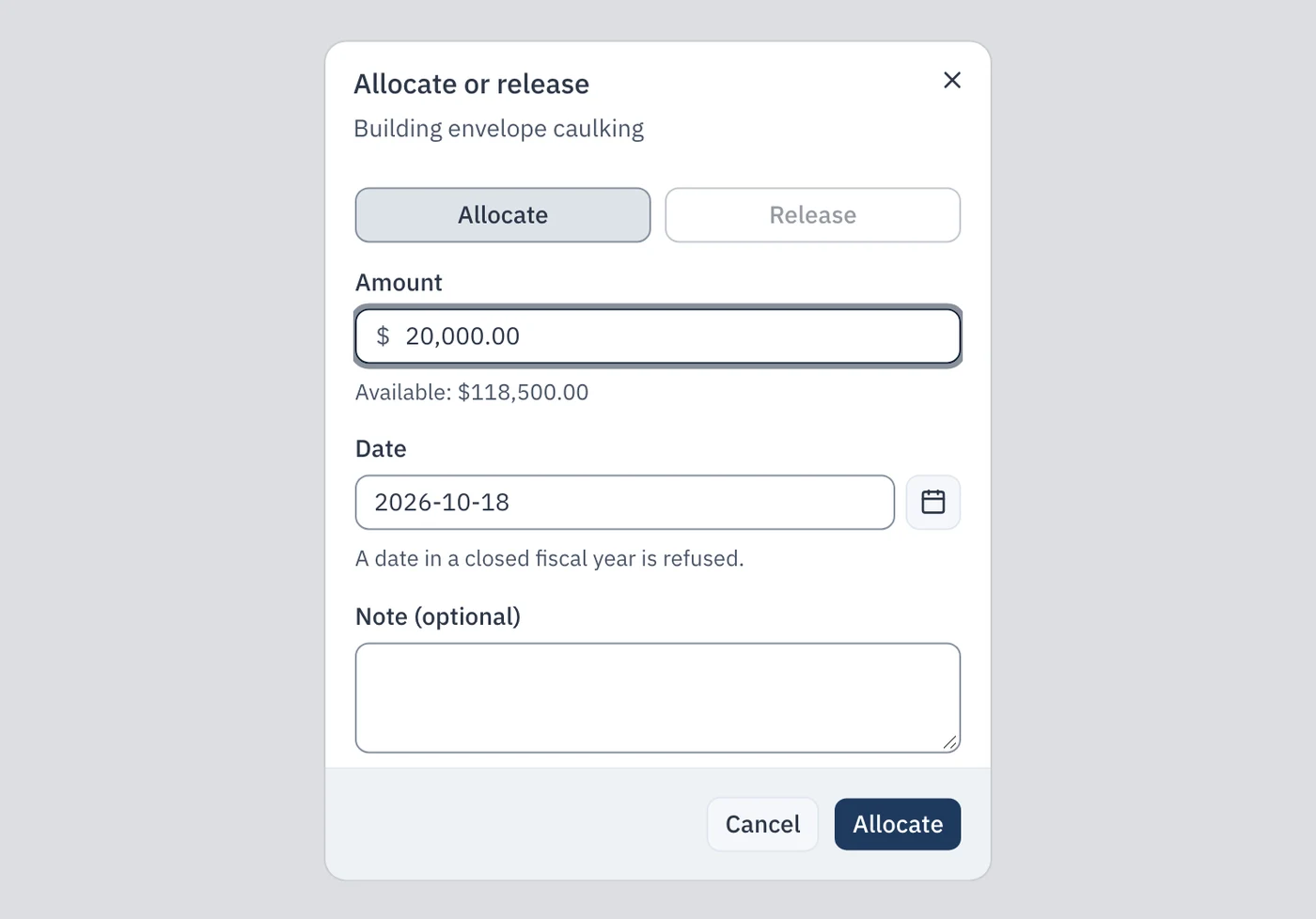
You can allocate all at once or a little each year, at the pace of the fund's contributions. In the example, the board has created three earmarks linked to the work plan: the caulking and the elevator, planned this year, and the corridor painting, planned next year.
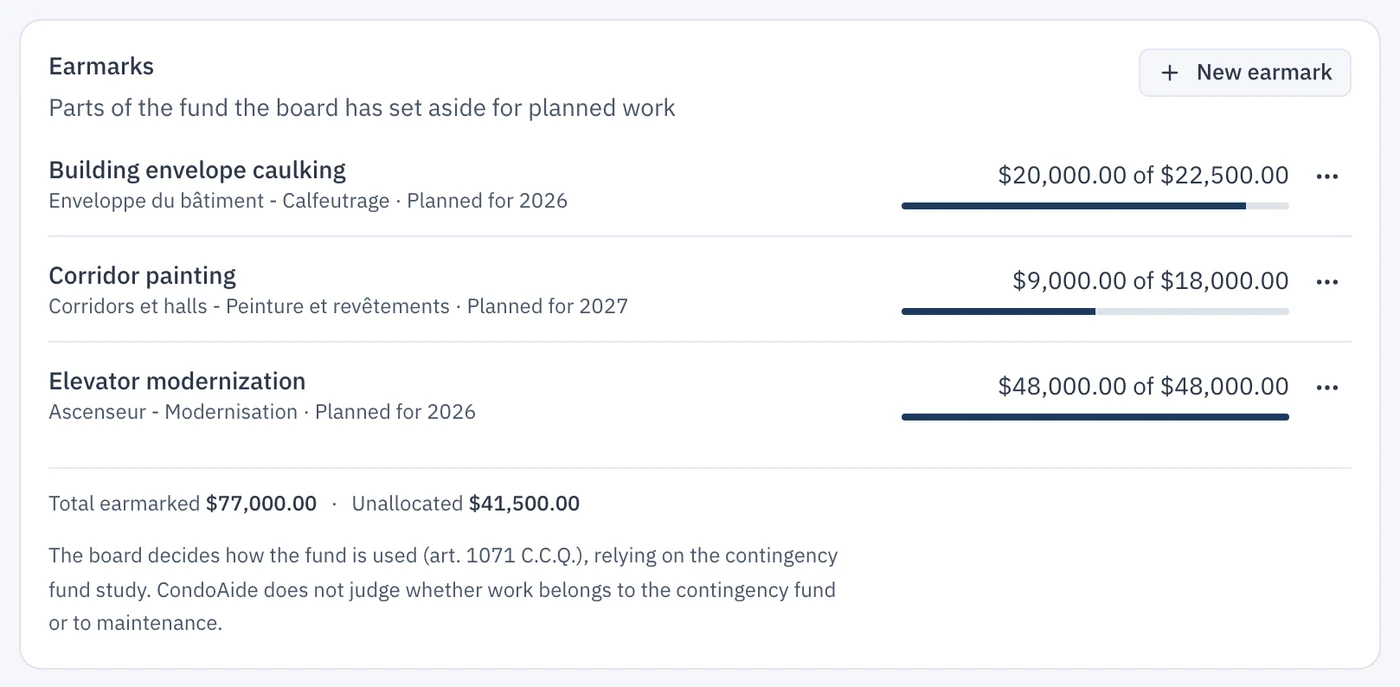
Each row shows the name, the linked work, the target year and the « X of Y » progress. Below the rows, Total earmarked adds up the earmarks and Unallocated gives the rest of the fund. Together they always make the fund balance.
Release
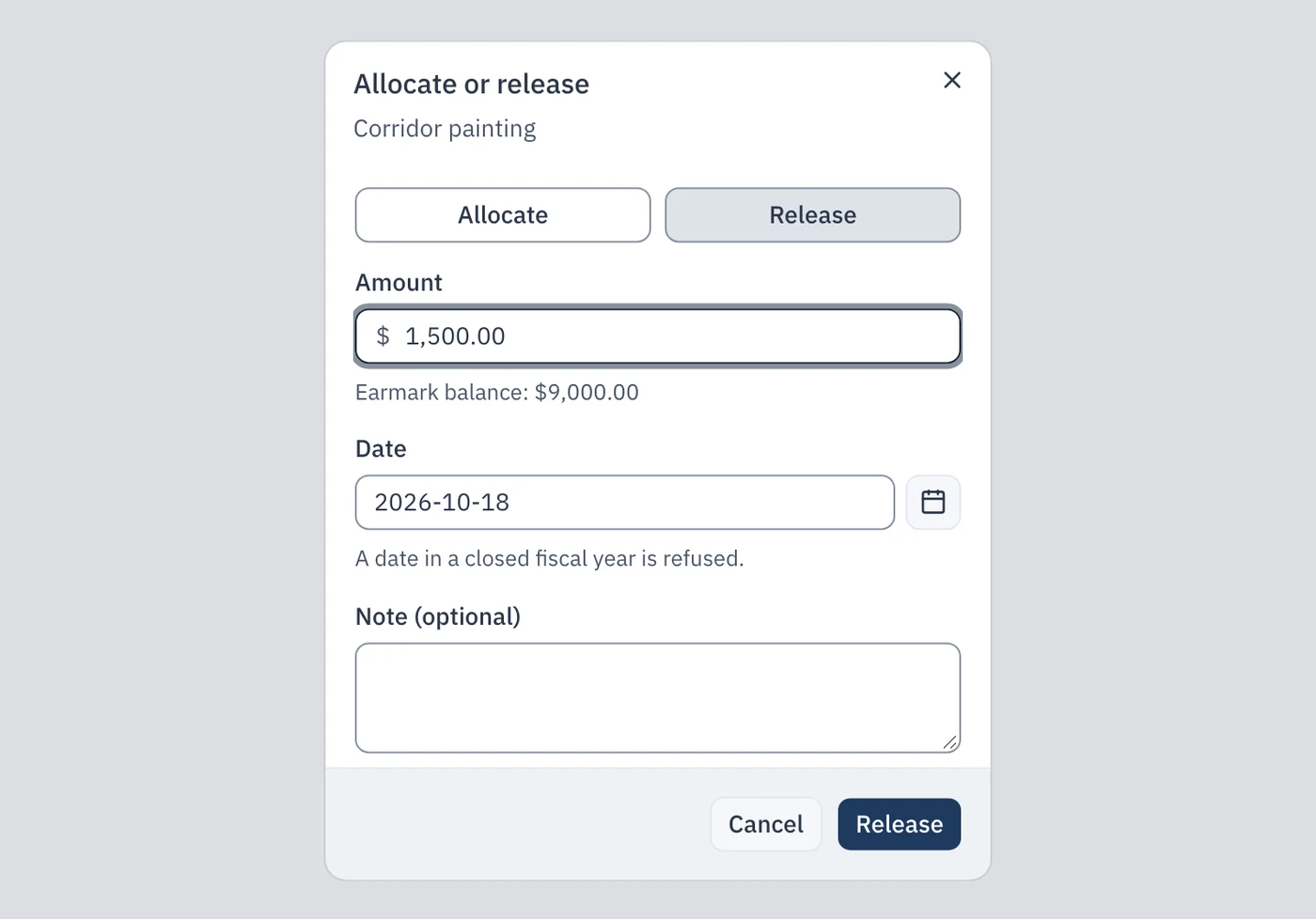
Release does the opposite: the amount leaves the earmark and goes back to the unallocated part of the fund. It is useful if the board changes its mind or set aside more than it needed. The window recalls the Earmark balance, which you cannot exceed.
Edit
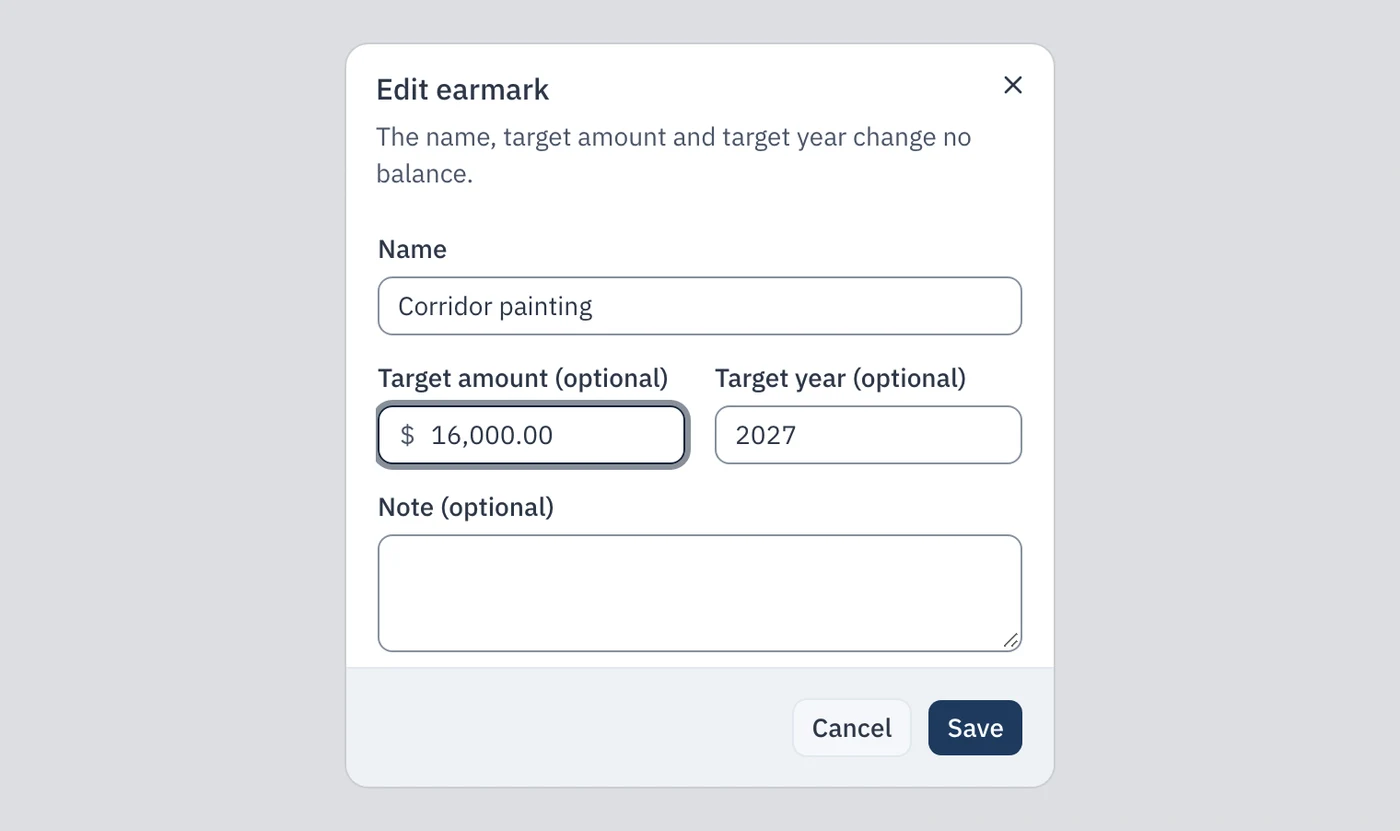
Edit changes the name, the target amount, the target year or the note. None of these changes touches a balance. For example, if the quote for the corridors comes in below the study's estimate, adjust the target amount.
4. Pay the invoice
When the work is done, the invoice is paid with the fund's money, as always. Record it first: in Contingency fund, Transactions tab, click Add expense, fill in the category, the description and the amount, and leave the status at Paid.
Then draw that expense from the earmark, in one of two ways.
From the work plan
- Open the Work Plan tab and click Mark completed on the work's row.
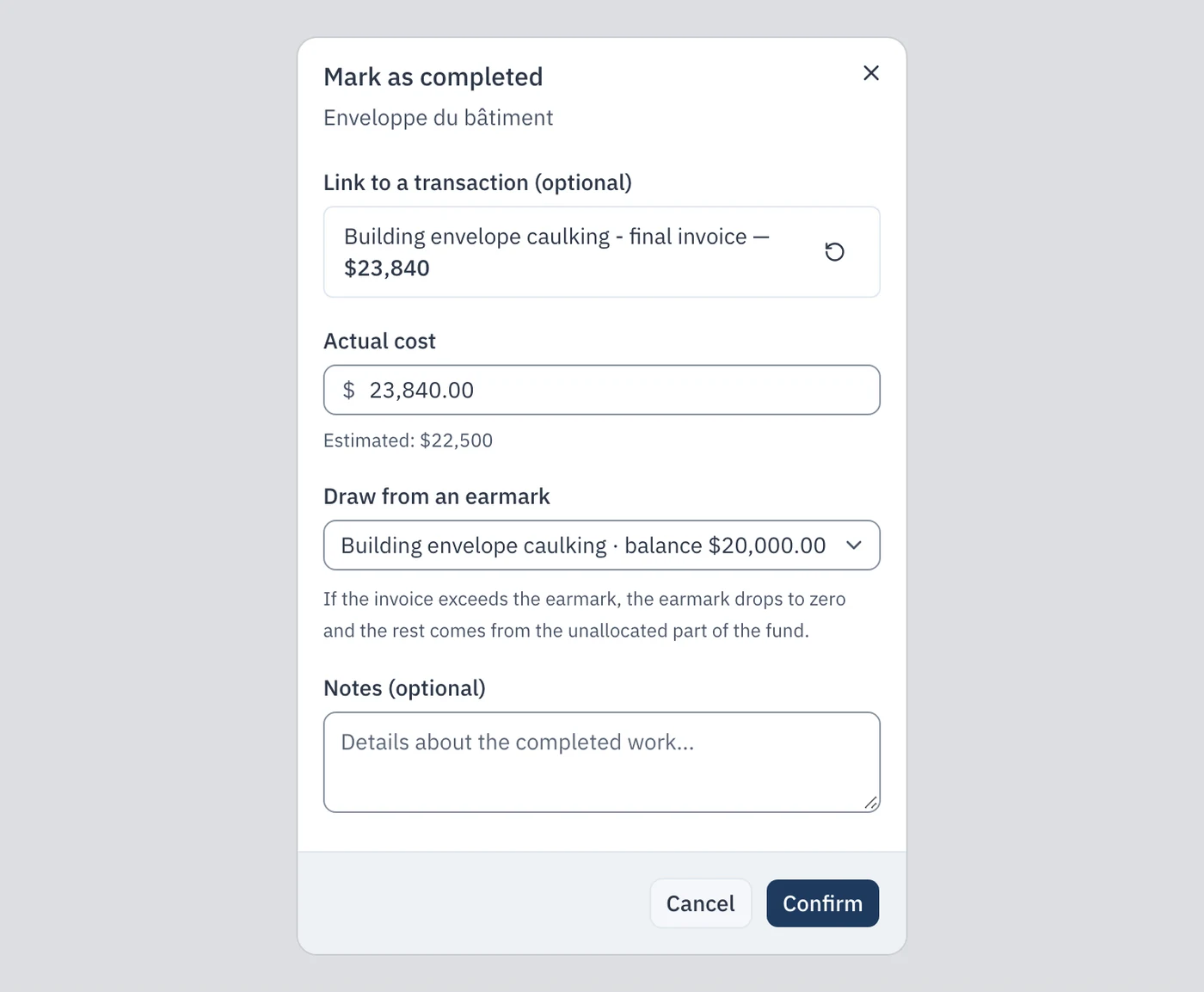
- In Link to a transaction, search for the expense you just recorded and pick it.
- The Draw from an earmark field already offers the earmark linked to that work, with its balance. Choose « No earmark » if you do not want to use it.
- Click Confirm.
When the invoice is larger than the earmark
The caulking invoice is $23,840.00, but the earmark only held $20,000.00. CondoAide never draws more than the earmark's balance: the earmark drops to zero, and the rest of the invoice comes from the unallocated part of the fund. A message tells you how much came from each.

If the invoice is smaller than the earmark, only the invoice amount is drawn, and the rest stays in the earmark.
From the expense, in the Transactions tab
If the work is not in the plan, or if you marked the work completed without choosing the earmark, start from the expense. In the contingency fund's Transactions tab, each expense of the fund carries a piggy-bank icon, Draw from an earmark, as soon as at least one earmark exists.
- Click the icon at the end of the expense's row.
- Choose the Earmark.
- The Amount to draw defaults to the expense amount; change it if only part should come from the earmark.
- Click Draw.
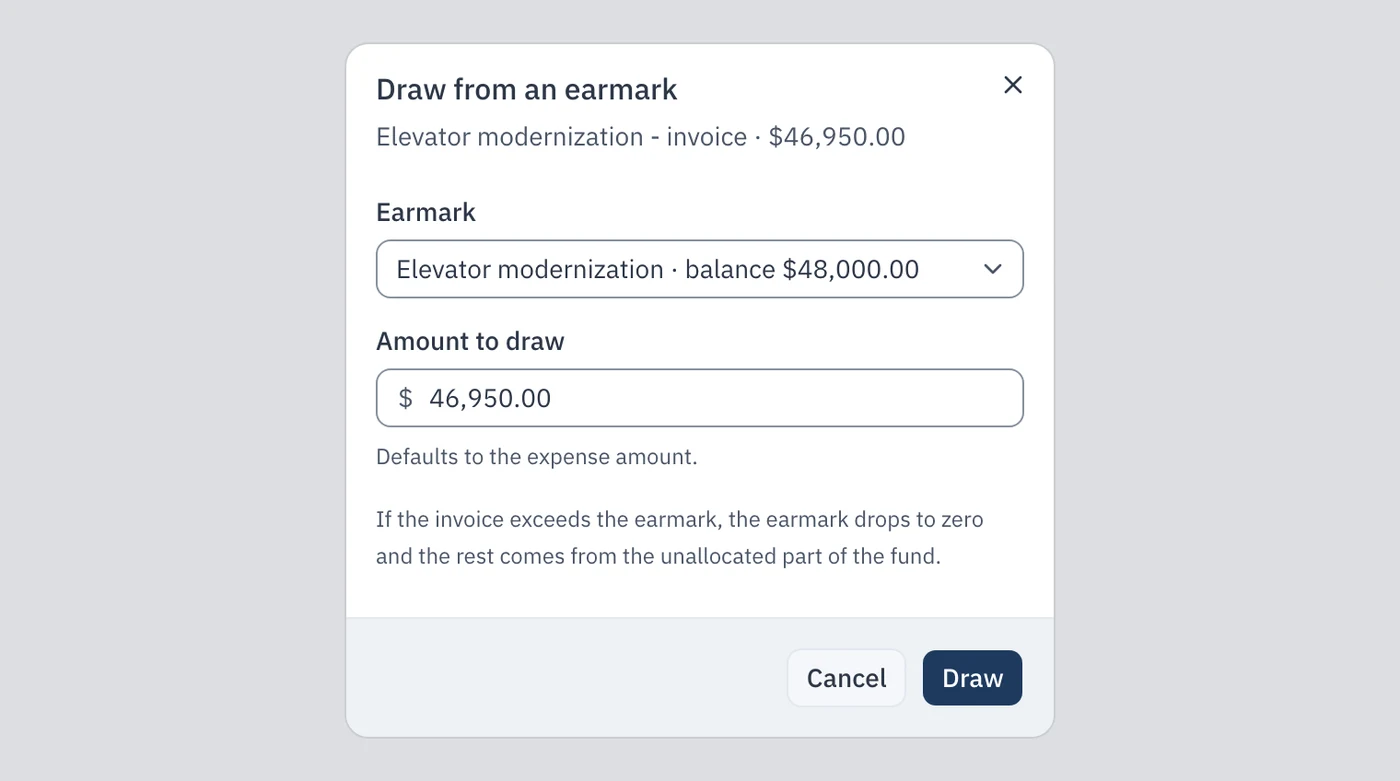
The same rule applies: never more than the earmark's balance. An expense cannot be drawn twice from the same earmark, nor beyond its own amount.
5. Read where the earmarks stand
When the earmarks exceed the fund
If a large invoice is paid by the fund without being drawn from its earmark, the fund can end up smaller than the total of the earmarks. In the example, the elevator invoice ($46,950.00) was paid without a draw: the elevator earmark still holds $48,000.00, while the money has already gone.
The card then shows a warning, and the unallocated part turns negative. The warning blocks nothing and does not change the balance: it is a signal for the board.
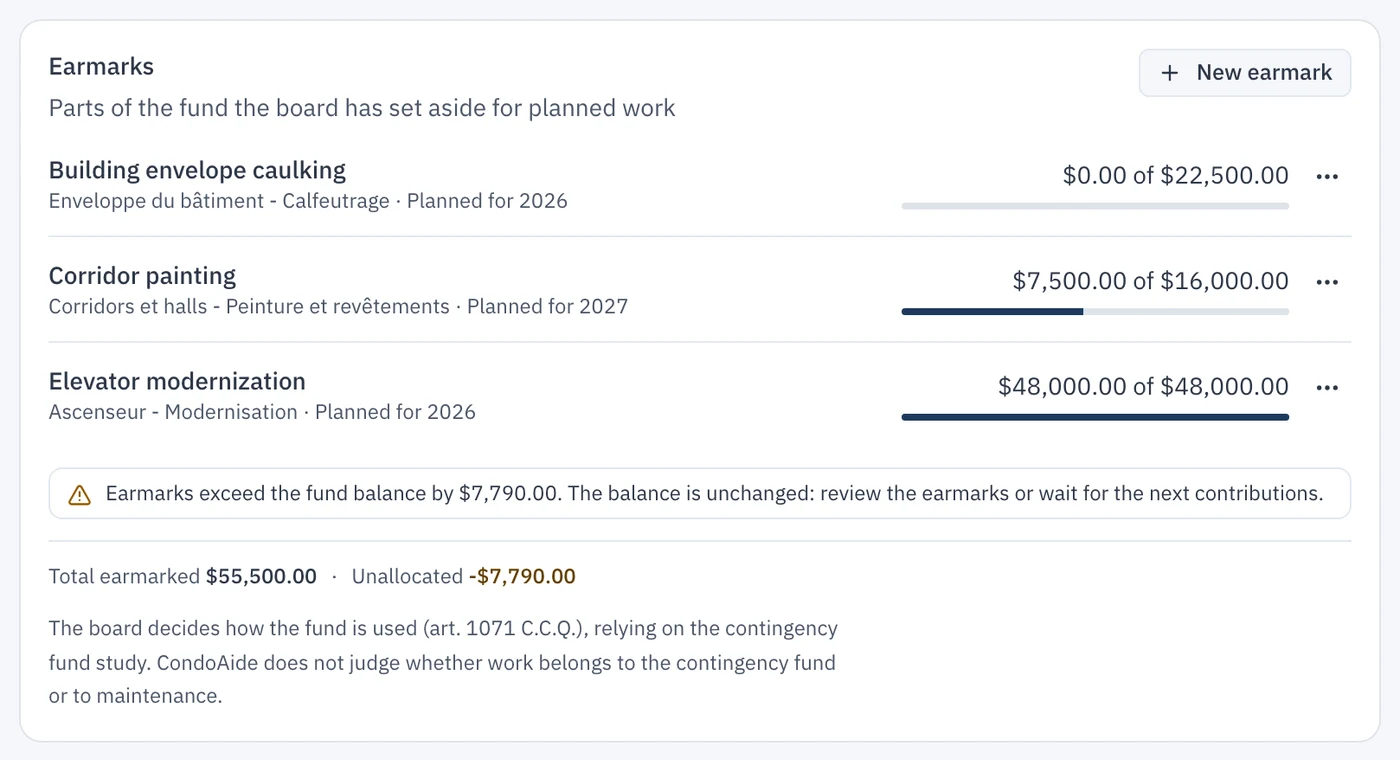
To settle it, draw the forgotten invoice from its earmark (section 4), release part of an earmark, or wait for the fund's contributions to close the gap.
Archive a finished earmark
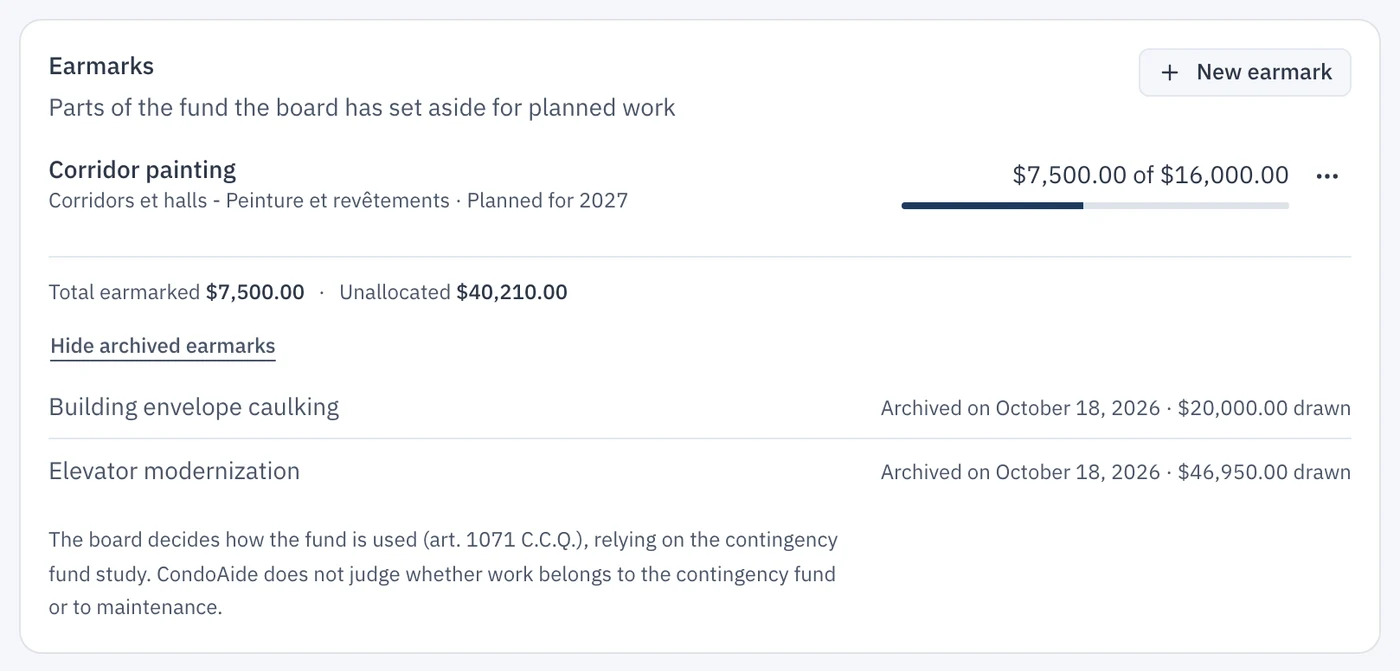
When the work is paid, archive the earmark: Archive, in the row's menu. It is no longer offered for new draws, and if it has a balance left, that balance is released to the unallocated part of the fund. Here, the elevator earmark kept $1,050.00 after its $46,950.00 invoice.
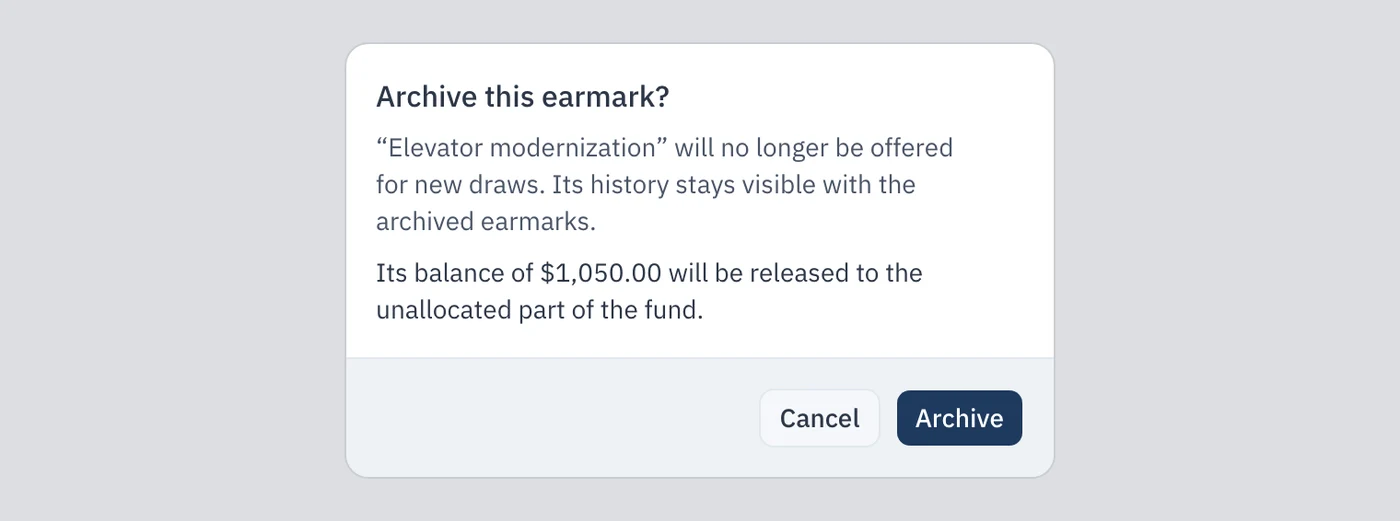
Archived earmarks stay visible: click Show archived earmarks below the totals. Each one shows its archive date and the amount drawn from it.
In the financial statements
The syndicate's financial statements show the earmarks. In the PDF, the note « Note - Internal earmarks » follows the contingency fund statement. It lists each earmark still active at the end of the fiscal year, with its target year and balance, then the unallocated portion. It recalls that these earmarks are board decisions and that they do not reduce the fund balance. The Excel file gives the same figures, with the total earmarked, in an « Internal earmarks » sheet.

6. Who sees what
- Board members who manage the contingency fund create earmarks, allocate and release money, edit them, archive them and draw invoices from them.
- A co-owner with access to the contingency fund sees the Earmarks card, its rows and its totals, read-only: no « New earmark » button, no menu on the rows. They do not see the fund's Transactions tab.
- A tenant has no access to the contingency fund.
The Who sees what guide details each role's access, screen by screen.