When a unit is sold, the person who proposes to buy it, or their notary, can ask the syndicate for the statement of common expenses due for that unit. Under article 1069 of the Civil Code, the buyer is bound by those expenses only if the syndicate provides the statement within 15 days of the request. The unit's owner must be notified before the statement is sent. CondoAide now follows the request from the day it arrives to the day the statement is delivered.
The request and its deadline
The page is in the menu under "Legal" › "Common expenses statements". The board records the request it received by email, phone or letter: the unit, who is asking and in what capacity ("Prospective buyer", "Notary", "Real estate broker" or "Other"), the buyer's name and the date it was received. The 15-day deadline runs from that date.
Each request shows the time left: "3 days left", "Last day today", then "2 days overdue". The clock stops on the delivery date, not on the date the statement is issued.
The page also points out that this statement is not the certificate on the state of the syndicate, which goes to the seller.
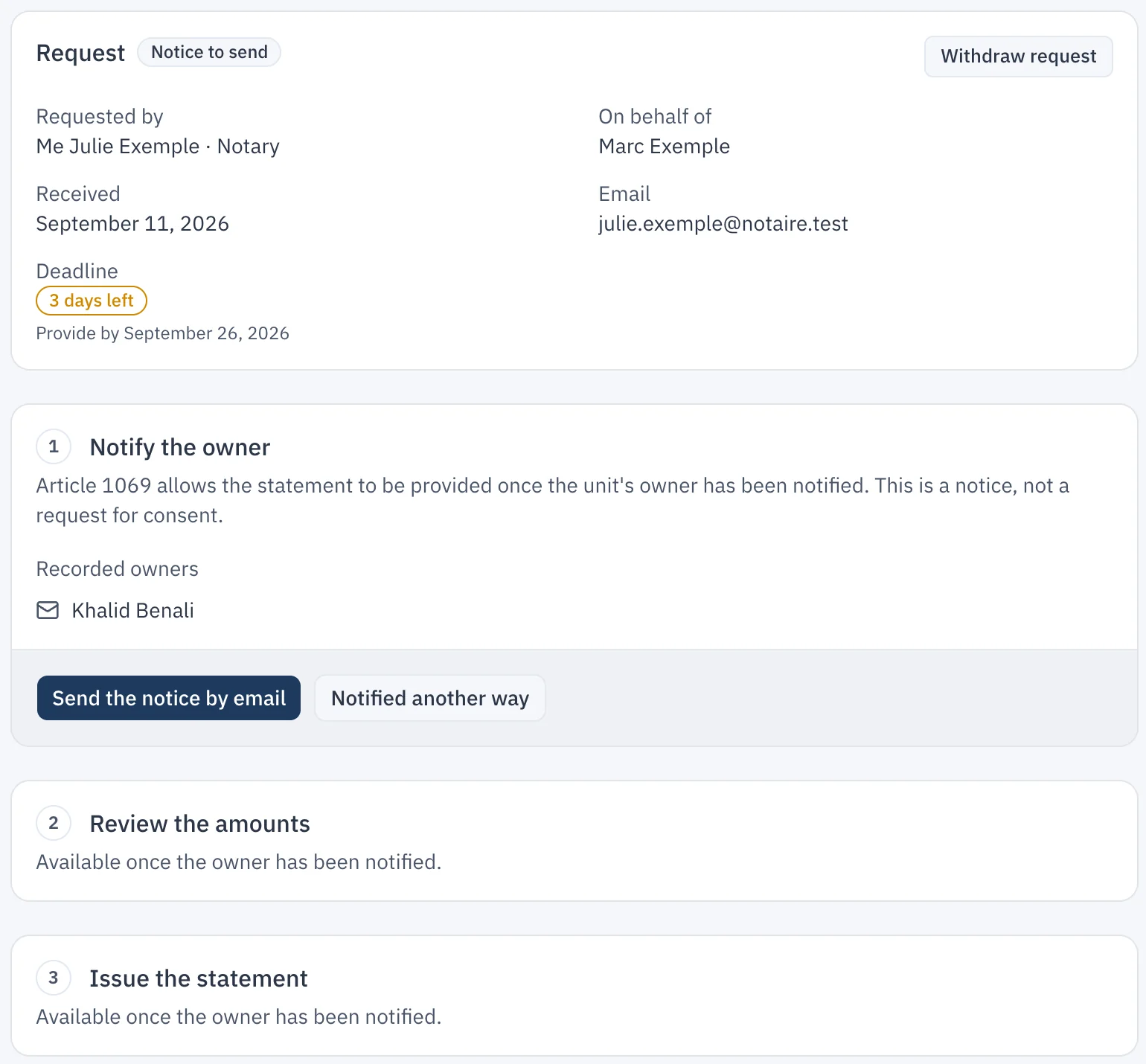
First, notify the owner
The first step is "Notify the owner". This is a notice, not a request for consent. The "Send the notice by email" button writes to every recorded owner of the unit who has an email address. If the notice was given by mail or in person, "Notified another way" records the date and how it was given.
Until the owner has been notified, the statement cannot be issued.
Review the amounts, then issue the statement
The statement is set at a date the board chooses, between the day of the request and today. CondoAide fills in the unit's installments that are due and unpaid, fund by fund, and the special assessment where there is one. The statement also shows the latest adopted budget and the adopted special assessments that are not yet due.
Interest is never calculated automatically. The board enters the amount claimed itself, with its rate and basis; without an amount, the statement says that no interest is claimed.
If the unit's charges are not tracked in CondoAide, the issue button stays disabled. A statement issued without that data would wrongly say that nothing is owed.
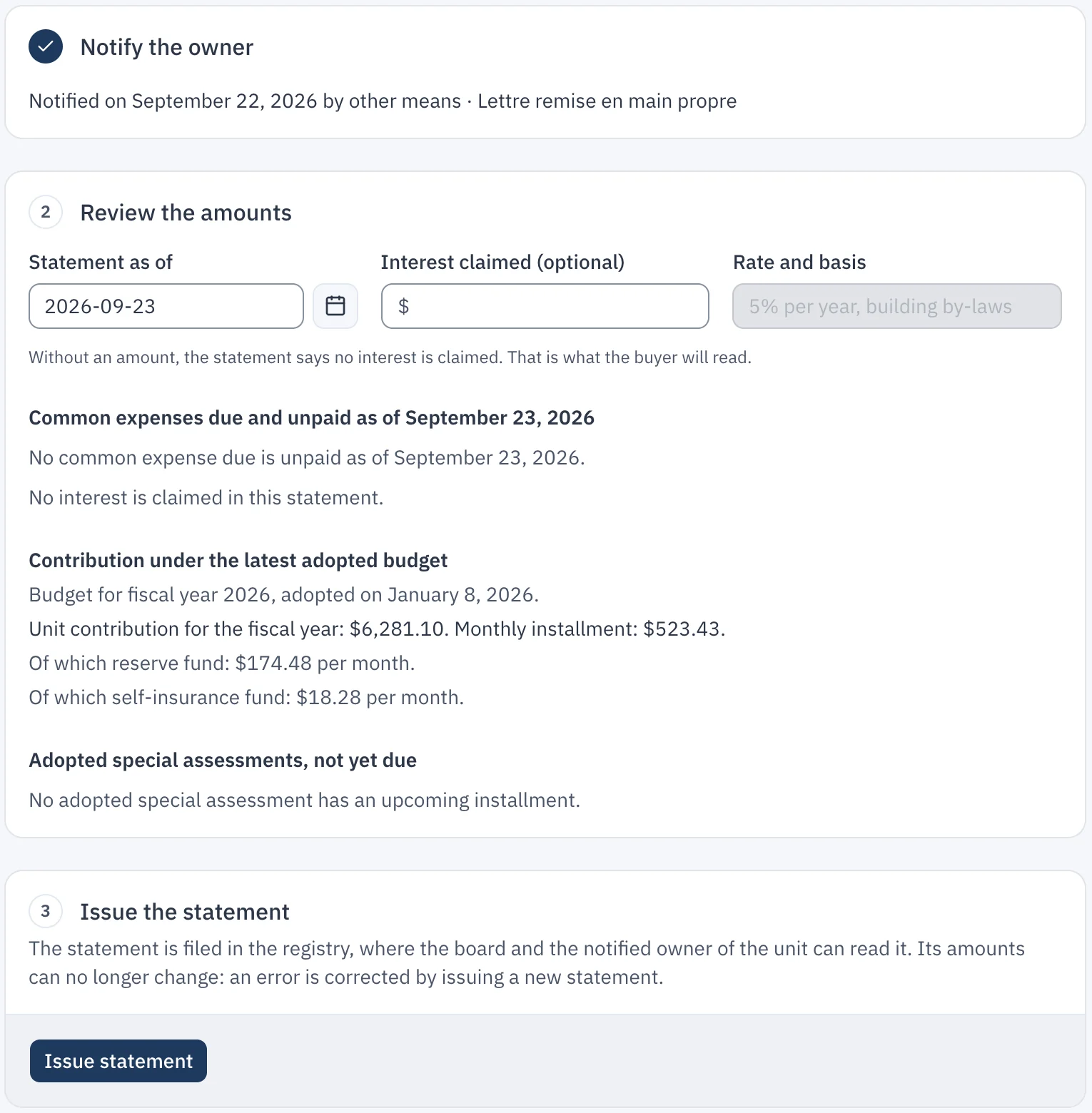
A statement that no longer changes
Issuing the statement creates the PDF and files it in the registry, under the "Common expenses statements" category. The board and the notified owner of the unit can consult it.
Once issued, the statement is frozen: its amounts can no longer change, the filed file, its access and its category can no longer be changed, and it cannot be deleted before its retention period ends. A mistake is fixed with "Correct with a new statement", which goes through the owner notice again. The replaced statement stays in the registry, and the list of requests shows it as "Replaced".
Deliver the statement
"Send the link" writes to the person who made the request, with a link to the PDF that is valid for 30 days. The email is recorded as the delivery, and every time the link is opened is logged. If the statement was handed over another way, "Record delivery" notes the date and how.
The statement is issued by board members or by the property manager. If the syndicate has handed the production of certificates to its property manager, the manager also issues the statements of common expenses.