In many syndicates, the property manager prepares the budget, keeps the books and follows the payments. Until now, CondoAide kept most of those screens closed to them, and the treasurer had to enter everything themselves. The property manager now has the same financial tools as the directors, except for the decisions that belong to the board.
What the property manager can now do
Under "Finances", the property manager now sees "Financial Statements", "Budget", "Other income" and "Payments", with PAD mandates, approvals, cycle verification, arrears and setup. "Assessments", where they saw only special assessments, now opens in full.
They can prepare and edit a budget, then freeze it for the board's review. They can prepare a special assessment, record and correct transactions, and do the bank reconciliation. On the payments side, they see PAD mandates and arrears, can reject a payment awaiting approval, and set the debit settings, such as the fee for a returned payment and the withdrawal day.
What stays with the board
Some acts stay reserved to the directors, the president and the syndicate's account owner:
- adopting a frozen budget, or unapproving an adopted budget;
- changing the surplus carry-over of a budget frozen for the board's review;
- approving a special assessment, or restoring a special assessment that was approved and then cancelled;
- approving a payment that is waiting for a second approval;
- changing the two-person approval thresholds and the designated approvers.
The approval thresholds set by the board apply to the property manager too: a payment above the threshold waits for a board member's approval.
The button is locked, and the reason is shown
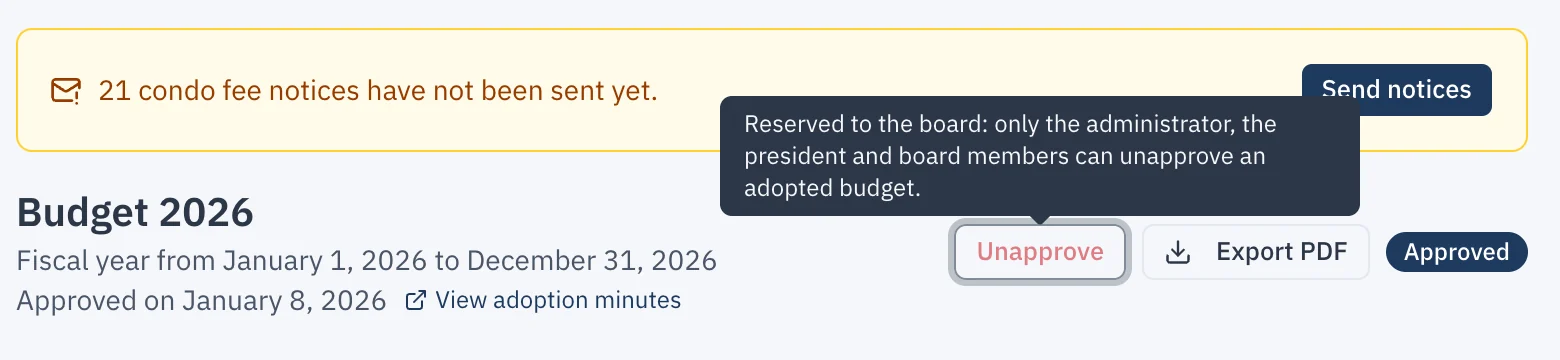
The property manager does not run into a missing button or an error. The button or field stays visible but disabled, and the reason is shown, for example in a tooltip: "Reserved to the board: only the administrator, the president and board members can adopt a budget."
These limits are enforced by the database, not only by the interface.