A reserve fund study imports into CondoAide and becomes the syndicate's work plan. But a study ages: one work costs more than planned, another can wait, a deposit has already been paid. The board can now keep the plan up to date without losing sight of what the study said.
Correct the year or the cost of a work
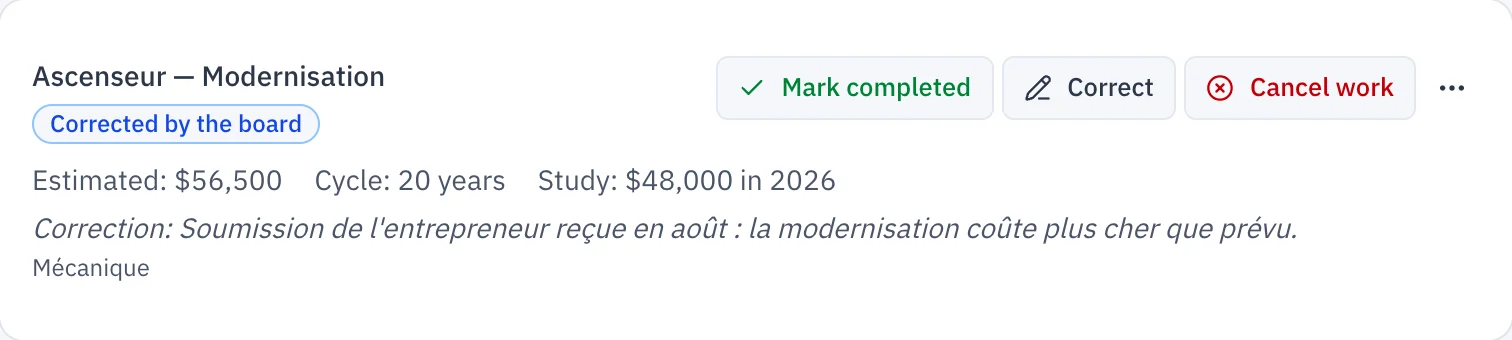
In "Contingency fund", on the "Work Plan" tab, a planned or approved work offers a "Correct" button. The board changes the year of the work, the estimated cost, or both, and must give the reason for the correction.
The study's figure is not overwritten. The work shows the "Corrected by the board" badge, the line "Study: $48,000 in 2026", for example, and the reason for the correction.
If a new study imported later plans something else, the board's correction is kept. The work then carries the "The study changed" badge, with what the new study plans.
The board can also "Add work" the study does not include, marked "Added by the board", and "Correct the useful life" of a component, which recalculates its later replacements.
Record amounts already paid
A deposit paid to the contractor in an earlier fiscal year should not be funded a second time. In a planned or approved work's "⋯" menu, "Amounts already paid" records the amount, the fiscal year of the payment and a required note.
The work then shows "Already paid" and "Left to fund". The budget plans only for the rest, while the plan keeps the full cost of the work. This record creates no transaction: it is used to calculate the budget.
Findings from an inspection report
Under "Works" › "Components", "Import an inspection report" reads the report's table of recommendations, as a PDF or an Excel workbook. Each finding is linked to the component it concerns when CondoAide recognizes it; the board checks every link before importing.
The findings then appear in the "Inspection findings" card, grouped by urgency: "Intervention required" or "Monitor / improve". Each one shows the finding, the recommendation and the location; the card names the report they come from and its date.
CondoAide recognizes the "Annexe 1 – Liste de recommandations" table in the PDF, or the "Liste Recommandations" sheet in the workbook; a report laid out differently is refused, with a message.
The actual condition of each component
Each component now has a "Current condition" field, from 0% ("Needs replacement") to 100% ("Like new"). A component whose condition has never been assessed shows "Not assessed", instead of a condition presumed new. Existing components therefore show "Not assessed" until someone enters their condition.
Board members and the property manager edit the plan and the components. Co-owners see the work plan, its corrections and the inspection findings, without being able to change them.