A meeting is a notice, a session, then minutes and follow-ups. Each of these steps now takes less work from the board.
Calling the meeting
Creating a meeting first asks for its date, then offers two paths: "Prepare the meeting", or "Record a meeting held today" for one that already took place.
The "Notice of meeting" card prepares the notice, whether or not the session is held in CondoAide. It goes out as a PDF attached to the notice email, and sending is refused while the time or the place is missing. The documents ticked in the appendices go with it. Before sending, the confirmation states, for each document that article 1087 C.C.Q. requires with the notice of the annual meeting, whether it is attached. A warning also reminds the board that every recipient receives these documents as they are, and that they must not reveal more about anyone than the meeting needs to know.
When the documents are too large for a single email, they follow in further numbered emails, and the confirmation says how many each co-owner will receive. An amended agenda goes out as "Updated agenda", with the newly added questions marked as such (art. 1088 C.C.Q.).
During the meeting
- The video call follows the director. If they leave the meeting screen to look at a document or a budget, a small window follows them on every page: who is speaking, their microphone, the recording, and "Go vote" as soon as a vote opens. "Back to the meeting" brings them back.
- Reloading the page no longer drops the call. The person comes back into the meeting; if it is being recorded, they confirm their recording choice again.
- For the board, attendance and voting in one click. A director marked absent clicks "Confirm my attendance". A recorded vote is saved on the first click, and the "Vote result" panel shows the votes for, against and abstentions with the chair's finding.
- A calmer console. A single status bar shows the recording, the quorum and the opening notice to read. The current item and the chair's controls ("Next item", "Suspend the meeting") sit in the agenda card.
The draft minutes, in one action
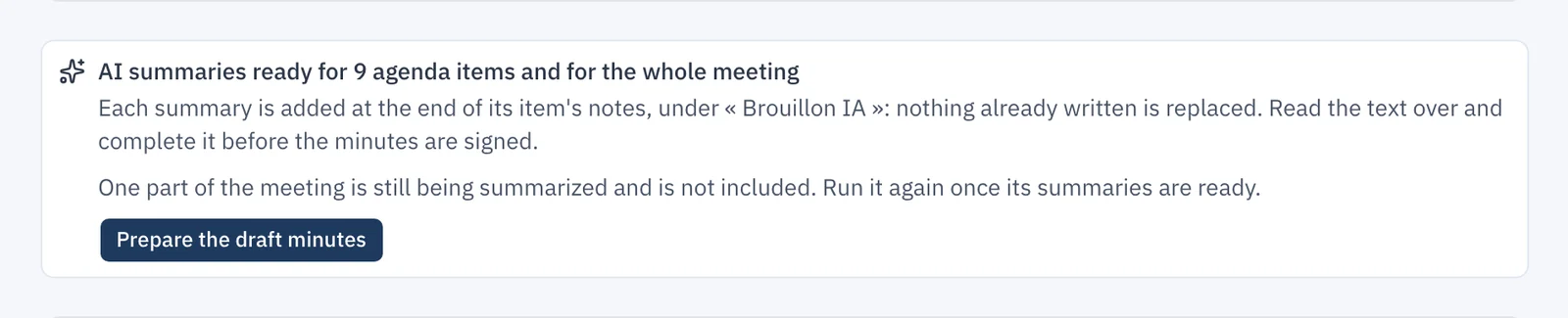
After a recorded meeting, the secretary and the chair get an email when the summaries are ready. The email contains no excerpt: it links to the minutes.
Until now, the secretary inserted each summary into its item, one at a time. "Prepare the draft minutes" now does it for every item at once, from the meeting's minutes or from its "Recording" tab. Each summary is added at the end of its item's notes, marked "Brouillon IA" (AI draft), and nothing the secretary already wrote is replaced. Each passage marked "Brouillon IA" must be read over before the minutes are signed.
Follow-ups become tasks
An item's summary lists the follow-ups decided during the meeting. On each one, "Create a task" opens a window that carries the follow-up over, with an owner (a director or the property manager) and a due date. The task is added to Work orders, with its origin: the meeting, its date and the item. It remains after the summary is destroyed, and it follows the same visibility rules as any other work order.
Also
- Written resolutions being signed appear under "Written resolutions", with the number of signatures received.
- A test meeting can now be deleted by the board, even after its session, as long as no notice was sent. A reason is required, and CondoAide keeps a record of who deleted it and when.
- A guest joining a video meeting first sees the syndicate's name and who invites them, then checks their microphone and camera; the recording question comes last.
Recording and summarizing meetings is described in Meeting recording.